Yet it`s not all rainbows and puppy dogs out there. Internet fraud victims aged 30 and under rose by 52% in 2015. Looks like we`re getting caught out - and it`s not just cash they`re taking.
Fraudsters can steal entire identities. And as comedian Joel Dommett can testify, identify theft can get pretty nasty.
I`m personally guilty of sticking a post-it not over my web cam and thinking job done.
But this Internet Safety Day, we can all do better - and we`ve spoken to the experts to find exactly how.
I spoke to Dr Jessica Barker, who runs cyber.uk, advising everyone from government to teens, and Robert Prichard, who runs The Cyber Security Expert, to find out how to practice safe security online.
How can I make sure no-one sees what I’m up to online?
Ask someone to show you their internet history, and it’s like you’ve asked them to get naked and dance the tarantella.
It’s not just embarrassment you can face. Without proper private browsing, your internet activity and location could be seen by prying eyes who can collect your data for profit or potentially fraud.
Most browsers have a ‘private browsing’ mode. But that won’t hide your history from your internet provider, your employer or the sites you visit, still leaving you vulnerable.
Signing up to a VPN (Virtual Private Network) will re-route your internet through another server and encrypt your web traffic. Rob explained it plainly: it’ll hide whatever you do on the internet as well as making it look like it’s coming from somewhere else in the world. Be warned: the VPN itself may record what you’re up to.
It’s how sneaky people used to watch international Netflix (don’t even try it – those days are over!) To find out all the techy details and how to get started, head here.
For the pros, Jessica mentioned The Onion Router (Tor), an anonymous worldwide network for those dedicated to disappearing, run by thousands of volunteers. Your internet data gets bundled through multiple servers before reaching its final destination and is encrypted multiple times on its way.
Picture a thief running through the streets changing disguises as they go. Well, congrats: your data is the thief.
To sign up, you’ll need to download a piece of software that adds plug-ins to your browser or you can download the Tor browser itself.
How can I lock down my accounts so no one can get in? Even my mum.
Everyone’s told you to get a secure password, and yet the most popular password of 2015 was 123456. Come on, guys!
So, how do you remember a password with more characters than Game of Thrones?
Rob recommends that you sign up to a password manager like LastPass or 1U Password Manager. They’ll create complex passwords and remember them for you.
Jessica and Rob’s top tip for securing your social media logins is to enable Two-Factor Authentication (2FA).
Nope, not an X-Factor spinoff about duets. 2FA adds another layer of security to your login, for instance, requiring you to input a specially-generated code to input before logging in.
Facebook, Twitter and LinkedIn all support it. Just head to their security settings and they’ll offer to add an extra layer of login verification.
Lastly, Jessica recommends making sure your online storage is secure. Add a password to your files and check that your cloud storage facility has encryption before signing up.
How do I know what people can find out about me online?
Give yourself a Google. You know you want to. If you find something a tad iffy, you can hide websites from appearing in searches about you using Google’s Remove URL tool.
Whatever the platform, check what you want people to see. It might seem obvious, but Jessica explains some teens even tweet their credit card details (yeah, we can’t believe it either).
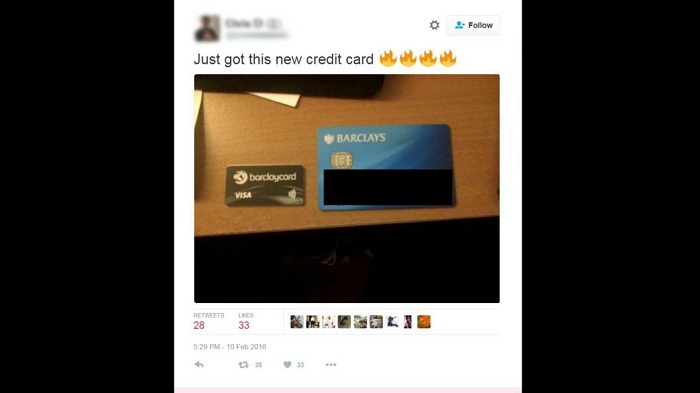
Use Facebook’s ‘View as’ tool to see what people can see on your profile and customise your privacy settings as you like. And don’t be lured into a sense of false security by more open networks like Twitter, Instagram or Snapchat.
Best practice is to be aware anyone from your mum to your boss could see what you’re posting.
What about what your phone apps can learn?
You’ve probably given your apps permissions you didn’t even realise… or want to. Those might include the app being able to use your microphone, read your texts and even listen to your calls.
As the video below shows, that’s a little scary.
Jessica and Rob both agree it’s up to you how much you’re willing to allow. Double check the permissions you’re giving each of your apps on your device and decide whether it’s worth it.
You’ll want your map app to know where you are, but does a photo app really need to?
Do I know what I`m signing up for with social media?
Be aware what the conditions of your social media accounts actually are. There`s a lot of complicated terminology in there - which basically boils down to the fact they essentially own your posts once you`ve put them out there.
Yup, including those photos of your `still carrying a little holiday weight` period.
So keep sharing, snapping and selfie-ing, just all with a little bit more wisdom.
/BBC/


-1780923278.jpg&h=190&w=280&zc=1&q=100)